Planet view and placing buildings

Most of this week’s work on my space 4X game has been in putting together a good system for placing items like 3D models of buildings on a planet’s surface. Part of the difficulty is in the fact that the planet graphics are generated entirely on the GPU, so the CPU doesn’t have access to that data. I came up with a fantastic system that works around that issue and gives access to not only height data but also details like what type of terrain is on a particular spot or whether it’s in an ocean.

So now I can place buildings on the surface of a planet, zoom out, rotate the planet and the building appears to stay put on the surface. When placing certain buildings like a water extractor, I can make it only placeable on water or make it fulfil any other criteria I want. I could make mining drills that you move around to find the best spot, or geothermal power stations that can only be placed on fault lines. There’s a lot of versatility in the system, so it’s been fun to work with this week.

Right now you can go into the various planets in the generated galaxy and place buildings anywhere on the surface at all. The plan is to define specific colony sites that you can build a base colony building on, and then buildings must be placed on a grid surrounding that building. It’s a gameplay restriction that has to be done for balance reasons, and to make the city blueprint system work. Certain buildings will require extractors, like fossil fuel power plants will require a coal mine and factories will require a mineral mine. You’ll send scout ships out on survey missions to find resources and then place the extractors on them to make the building start up.

Graphics:

The main colony area is is where important buildings like factories and research labs are all placed, and extractors are placed far afield where resources are located. Graphically, I need a way to show the population increase in a colony. As the colony’s population grows, you’ll start to see a sprawling network of roads and houses emerging from the main colony area. By the time a colony is at its population limit, the area around it (example: most of the screenshot above) will look very developed.

I’ve been experimenting with different light angles for the planets, and although right now I have maintained authentic lighting angles based on the angle of the planet and its point in its stellar orbit, it often doesn’t look very good. A colony area might sometimes be in darkness, or glaring sunlight that makes the terrain look flat. Ultimately, graphics take priority over realism in a game like this, so I’ll likely lock the lighting to an angle that makes whatever’s in the center of the screen visually pleasing at all zoom levels. I’ll post some screenshots of this when it’s done.

http://www.youtube.com/watch?v=oRVbvG-TpJc Predestination 4X game Galaxy Map: System window demonstr

Predestination 4X game Galaxy Map: System window demonstration

Please watch fullscreen (1080p available). The video’s a bit darker and a lot blurrier than the actual game because YouTube is bloody awful at encoding videos, but you get a clear enough idea of the effect in fullscreen.

This is an update on the galaxy map. I’ve built the system window, and designed a smooth transition for opening it. When you click on a star, the star rises out of the background and its planets fade in, then the window around it fades in. When you close the window, the star shrinks again and visibly moves toward the star, even if it’s moved since the window was opened. So far all planets have terran graphics, but the distribution rules are already in.

I originally had a full solar system model with accurately modelled inner planets, gas giants, eccentric orbits etc, but for gameplay reasons I’ve had to simplify it down to a maximum of six planets. It would just be far too difficult to actually click on planets if I had proper solar systems, unless I made solar system view its own full screen and gave it zoom/scroll controls. I don’t think that would add much in terms of gameplay, and it would be irritating for people who want to quickly get to a planet. This is definitely one of those cases where I deferr to MOO2’s design, because if it’s not broken there’s no need to fix it.

After testing the system I displayed in my last video wherein the camera centers on a clicked star and the galactic plane comes up to the level of the star, I found it far too clumbsy. Trying to open the system view when you have to double click on a star that starts moving after the first click isn’t particularly fun. I’ve removed that mechanic and now instead just have the system plane right in the middle of the stars. I find it still provides enough perspective, and in terms of usability it’s a lot more friendly on the system window mechanics.

Like the system window transition effect?

http://www.youtube.com/watch?v=_QCmvsKSXic A video of the 3D galaxy map for Predestination. Please w

A video of the 3D galaxy map for Predestination. Please watch it in 720p fullscreen, otherwise a lot of important small details like the lines between stars and the galactic plane are lost. A video makes it much easier to see how the plane and lines help maintain perspective, and makes it possible to show off a nice new supernova graphical effect. The supernova effect is similar to the one used in the background supernova remnants, but modified to look good in 3D as you pan around it.

Anyone have any feedback on it so far or does anyone have a question they’d like answered?

Player-generated content in a 4X game

I’ve been doing mostly under-the-hood code optimisations today so I don’t have any pretty screenshots to show for it, but I do have an idea to share that I’ve been wanting to run by other people. Master of Orion II is my touch-stone for game design, and it only had sandbox style games. But when I introduced a 3D map I realised that also adding singleplayer missions or challenges might actually be really cool. One example mission might be set up so that you own one planet that’s surrounded and you win if you can hold out until a doomsday technology is researched to let you smash your aggressors to pieces. Another might have a colossal galaxy and the challenge might be to find and secure a wormhole hidden somewhere in the chaos, then launch an attack fleet through it.

There’s a lot that could be done with these scenarios, as I could make them with unique maps, races, technology trees, etc. But why should I have all the fun of developing fun singleplayer challenges? I’ll need to develop a map editor tool at some point, so I could put a little more effort in and develop a full scenario editor that players could use to design their own challenges. They’d be submitted to an online repository and players could vote on them, with the best even making it into the game client.

You could try to make an unwinnable map and dare players to beat it, or just make a normal map with a few twists like new technologies and races. Perhaps most exciting would be that you could remake your favourite battle from sci-fi, or faithfully reproduce the star map of Earth’s local stellar neighbourhood for that oldschool Elite kick. Does that sound like it’d be worth doing?

4X game galaxy map, 2D or 3D?

Space 4X games are typically played on a 2D map, not because of any technical limitation but for gameplay reasons. 3D maps are difficult to visualise and strategise on, for example they make it more difficult to see the area of space owned by a particular enemy. Those games that do have a 3D map tend to mechanically simplify it with a “star lane” mechanic where ships can only travel along set paths between certain stars. For all intents and purposes, that isn’t a 3D map any more; it has eliminated any mechanics that actually use the third dimension. The alternative is to use a 2D map (like this one below), which is requires a bit more suspension of disbelief.

While I don’t want to diverge too heavily from the fundamental mechanics of the genre’s previously successful games, I do want to have a crack at bringing a third dimension to the map in a way that avoids these problems. If you’re interested in space 4X games, please leave a comment on this post about whether you’d want a 2D map or 3D, or answer the post with anything else you’d like to add. I’d really appreciate it!

In this article, I’ll examine the advantages and disadvantages of a 3D map in a space 4X game, and discuss how I’ve tackled each of the problems a 3D map raises.

A few advantages of a 3D map include:

  • A bit more realistic, less need for suspension of disbelief.
  • Line of sight mechanics — A nebula between two stars could block scans, slow ships etc. While this is possible with 2D, it’s more interesting on a 3D map and there are more ways to get around the nebula.
  • You can be fighting a war on more than two fronts. On a 2D map, it’s rare to get more than 1-2 enemies bordering your space. On a 3D map, you could get 3-4.
  • Expansion has to be more tactical, as your borders are always in range of more stars than on a 2D map. It takes a lot more expansion before your “inner” systems are protected by a buffer zone, as you need to colonise every system in range of your inner systems to deny the enemy their use.
  • I want to implement system tech like wormhole generators to link two systems, FTL missiles that can hit nearby systems etc. These would all be range-limited, and naturally on a 3D map there will be more systems in range for things like that.
  • For singleplayer missions using designed custom maps, you can do a lot more with 3D than you can with 2D, there are fewer limits on creativity. I would go as far as to say singleplayer maps in 2D would be uninteresting.

Unfortunately, it also raises a few problems:

  • Distance: Difficult to judge the distance between two stars unless you’re moving the map.
  • Fuel range: Difficult to visually estimate whether a star is in ship range. MOO2’s fuel range mechanic prevented players from exploring too far from their colonies, necessitating expansion by colonisation. This mechanic is very important, and needs to be preserved.
  • Nearest stars: In 2D it’s easy to see the nearest stars (best ones to explore first), but in 3D it’s much more difficult.
  • Information overload: In some games, you get absolute chaos all over the map by the end of the game as every solar system is owned and there are ships flying all over the place. Working out what ships are going where is complicated enough without lines criss-crossing everywhere in 3D.

I like to think the perfect 4X game would use a 3D map but solve the usability problems associated with it. 3D would also open some great singleplayer scienario options, so I really want to try to do it. But I also want the option to make a flat map for fans of the classic 4X gameplay. With that in mind, each of the problems above has to have a solution for both 3D maps and flat maps. Here is how I am currently tackling each of these problems:

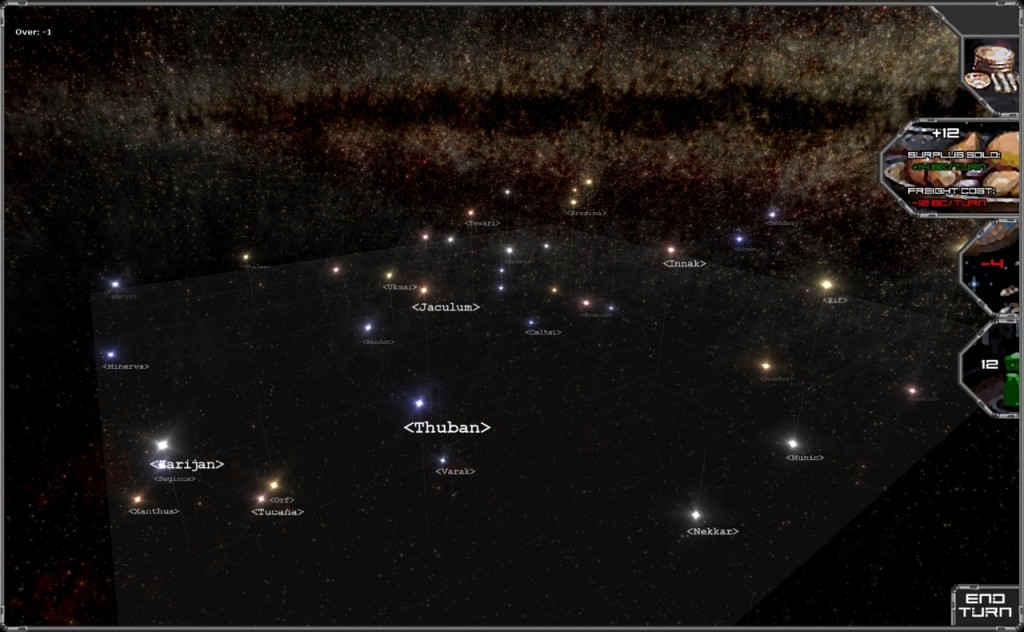
Distance: I borrowed a trick from Elite. I have a flat plane bisecting the playable field of stars and each star has a line drawn from it to the plane. You can see this in previous screenshots. In 2D mode, the distance is easy to judge and the lines are not necessary.

Fuel range: Merged the “fuel” mechanic with K240’s sensor mechanic; Each colony has a sphere around it inside which you can see objects (ships etc) in space, and travel outside that sphere is dangerous/impossible. The areas covered by sensors can be shown on the map as green wireframe spheres. I may try blurring or darkening everything outside the sphere to make it obvious what’s in range when the spheres are toggled on. In 2D mode this mechanic is much simpler, with just a circle around the colony cut out of the galactic plane. Below is an example from a really old previous version of the project (this feature hasn’t been re-implemented yet, but it’s next on my list):

Nearest stars: When you click on a star to bring up its system window, the map plane moves up or down to be on level with that star. This way you can see how far above/below each star is relative to the currently selected star, making it easier to see which ones are nearby.

Information overload: This will just have to be taken one UI element at a time. As a general rule, I like user interfaces to be minimalist: Elements should be immediately recognisable, with very few buttons and as little text as possible. MOO2’s UI is a good example, as the state of play can be immediately figured out by looking at the main screen for just a few seconds. I’ve seen some terrible UIs in 4X games (including dropdown menus, spreadsheet-like forms and massive text-filled UI elements) and I really want to avoid that. My concept artist is equally minimalist and has already stated that his mission is to get rid of any UI element that doesn’t absolutely need to be there.


At least, that’s the theory:

I think I’ve solved the problems above, but I have yet to run them by anyone else to give my solutions a proper usability test. I also wonder what other problems a 3D map poses, as I may not have covered them all. If you’re reading this and can think of any more or want to add your two cents, please drop a comment on this post.

As a side-note, it should be relatively inexpensive and simple to set up head-tracking for the game. I could install a pair of battery-powered IR LEDs in a pair of cheap cinema glasses with the lenses popped out, then use a Wiimote as an IR camera. That would let me add the ability to turn the map etc by moving your head, providing real 3D feedback. This could help make the 3D more real for players who have trouble with 3D maps, and it could add some awesomeness to ship design and combat. How I’d distribute them is another question entirely, but it could be very popular with gamers who own a Wii.

An example of the playable galaxy map screen when it’s generated in 2D. It would also be possi

An example of the playable galaxy map screen when it’s generated in 2D. It would also be possible to generate the map in 3D and then flatten it to 2D, this shouldn’t cause overlapping stars but might make the distances between stars unintuitive. I’m increasingly a fan of a standard 2D map, but the options for both 2D and 3D are available.

Galaxy map and screen transitions

One of the challenges in developing a space 4X game is that the game has to be played on the colony, solar system and galaxy levels. Master of Orion II had separate galaxy map and colony management screens, and the solar system view was a small window that opened inside the galaxy screen. This was handy because sometimes you’d exit out from a planet and want to fast-forward a few turns before returning to that planet. I like this functionality, and want to preserve it in Predestination.

This means I need separate galaxy and colony views, which I can already do with my GalaxyScreen and PlanetScreen. These are distinct screens that can be switched between instantly, but I need to build a visually smooth transition between them. On selecting a planet, I’d like the game to zoom in on the planet before switching to the PlanetScreen so that the two screens look identical and you don’t notice the transition. I also need a solar system window that can be brought up in GalaxyScreen.


Above is a small cut out of a larger screenshot of the current GalaxyScreen (Click for full screenshot). This is the playable galactic field of stars. Details of all the planets at each star are already generated based on a previous project, so the next stage will be to implement the solar system window to draw those planets and their orbits. After that, I’ll have to make the transition for when you click on a planet to go into planet mode.

Introducing Predestination

Today I mark the start of a new year by kicking a new project into high gear. It’s always been a dream of mine to develop a space 4X game, and more specifically to develop a spiritual successor to Master of Orion II. MOO2’s own sequel was a colossal let-down, removing most of the elements that made its predecessor great and ignoring decades of 4X games from which to draw inspiration. Since then we’ve seen some great titles like Galactic Civilisations and Sins of a Solar Empire, but I don’t feel like any have really recaptured the magic of MOO2.

This year I’m now in the perfect position to make that dream a reality. I have a stable job as EVE Online columnist and contributing editor for MMO blog Massively, which pays the bills but leaves most of each week free to work on the project. I also live with two close friends, one a talented artist and the other an all-round clever-cloggs with a flare for planning, management, writing and social networking. Although I write for a living, I myself am a programmer with a Masters degree in computer science from one of the UK’s top universities.

Development schedule:

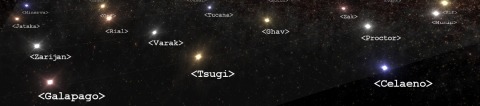
For the past few years I’ve only put a few days per month aside for game development projects and always worked on them solo. In that time, I’ve built a procedural graphics engine able to render complex space scenes and zoom down onto the surface of planets in realtime. This year, I am kicking the project into high-gear with several days of development every week and two new helping hands. Below is a video showing off what I have so far (best viewed in 1080p fullscreen to see all the stars).

This blog will serve as a commitment device to make sure I work on the game every week; At least once per week I will write a blog update with details of the game’s progress, new screenshots, videos, or just gameplay ideas that I need to get on paper. If you’re interested in the game’s development and follow the blog, please consider commenting now and then to help keep me engaged and motivated.

Deciding on a name:

I’ve been throwing game name ideas back and forth for a long time, originally settling for the completely non-committal and thoroughly underwhelming working title of “untitled space game”. 4X games usually have words like “Conquest”, “Empire” or “Civilisation” in the name, and space 4X games sometimes sport recognisable space terms like “Solar”, “Space”, or “Stars”. Instead, I’ve chosen a name that has none of the obvious terms in it but should be in the vocabulary of any sci-fi fan: Predestination.

The Predestination Paradox (or Causality Paradox) is a theoretical event in which a person goes back in time to change something, but in the process causes the very thing he went back to change. I don’t want to give away too much of the storyline right now as it may change, but obviously time travel will feature heavily. For one thing, time travel a fantastic way to explain why each race starts the game at the same time and with the same technology level.

If you’re interested in this indie game development project, follow the blog and I’ll post updates as it progresses. There are also key articles listed on the left hand side of the page going into detail on various game mechanics like the research system and city-building concept.